Launch offers Save up to 47% Free upgrades for existing owners
RIVENFX
RFX07 / GRANULAR TEXTURE & LOOP INSTRUMENT · VST3 + AU

Orrery.

Play something simple. Get a world back.

Eight texture engines catch what you play and send it back as octave layers, grain clouds, strummed rakes and darkening echoes, locked to your tempo. Underneath runs a looper whose heads move at any speed from −4× to +4×, straight through zero into reverse.

  • 8 ENGINES × 4 VARIATIONS
  • THROUGH-ZERO LOOPER
  • ZERO LATENCY
  • WINDOWS + MAC
£29Launch price · £49 after launch
ORBITAL MONITOR
ENGINE DATA · SILENT

The plugin’s own visualiser, replaying the frames the engine produced while it rendered this clip: vocal “ah” through Nebula Drift. Radius is pitch; every particle is a grain it fired.

01 / TEXTURE

Eight engines. Four variations each.

Four families: loops, grains, fracture and echoes. A variation is a recipe of rate stacks, grain lengths and envelopes, not a different effect, and every switch crossfades, so you can browse while you play. Each clip below is one factory preset on the source its notes recommend. Flip between dry and wet; loudness is matched.

LOOPS / 01
SILENT PREVIEW · PRESS PLAY
StackLoops
00:00.0 / 00:23.9
SOURCE / FELT PIANOPRESET / PERIHELIONSTACK CDENSITY 62%REGEN 60%SPACE 52% HALLMIX 70%
LOOPS · 01

Stack

Captures a short loop and sustains two to four copies at once, each at a different octave. The upper octaves sit as shimmer, not as peers.

A chord becomes a stable, harmonised pad that follows what you play.

A
1× + 2×
B
½× + 1×
C
1× + 2× + 4×
D
½× to 4×
TIME · 1/16T to 1/1

Time

The event clock. Synced divisions with triplets and dots, scaled ¼× to 8×, or free in milliseconds.

DENSITY · 0–100%

Density

How busy the texture is. On the glitch engines it is the chance a slice fires.

REGEN · 0–100%

Regen

How long captured material keeps re-firing. On Taps and Smear it is the feedback.

SPACE · 0–100%

Space

The blend into the reverb. Pair it with Ambient for the biggest wash.

02 / THE LOOPER

Then bend time.

Record a phrase, close the loop, and the play and record heads become satellites. Each runs continuously from −4× to +4×. Half speed is a true octave down; negative rates literally play backwards, and the engine crossfades through a small dead zone so passing zero never stalls or thumps.

In Tape mode an overdub at a different speed bakes the varispeed copy into the loop, so one phrase grows an octave-down bed beneath itself. Studio mode stacks clean layers instead.

  • −4× … +4× Independent play and record heads
  • Tape / Studio Baked or clean overdubs
  • 8 layers Undo and redo
  • Resample Flatten to a fresh 1× buffer
  • Beat / Bar Quantised loop actions
  • 60 s Saved with your project
LOOP RECORDER / 03
PRESS PLAY
PLAY-HEAD RATE+1×0×−1×

One take on the release build: two bars of synth pluck recorded, then the play head drops to ½× and sweeps through zero into reverse. The satellite on the ring is the play head, drawn from the engine’s own state.

03 / TONE & SPACE

Shape the aftermath.

After the engine, a fixed chain in signal order, then a linear dry/wet mix and an output trim. Mix at 0% is your dry signal, untouched.

  1. ARHYTHMIC GATE

    Contour

    Square · Ramp · Triangle · Saw, locked to the event clock, on volume or filter.

  2. BPITCH WOBBLE

    Mod

    One LFO, 0.01–20 Hz, routed to grain pitch for vibrato across the cloud.

  3. CLOW-PASS

    Filter

    Zero-delay-feedback state-variable filter, 20 Hz–20 kHz, smoothed so sweeps never zipper.

  4. DSPACE

    Reverb

    An eight-line feedback-delay network with four measured characters.

  5. OUTMASTER

    Mix & output

    Linear dry/wet, FX gain into a soft safety knee on the wet bus, and an output trim from −60 to +6 dB.

Room
RT60 ~0.75 s · Tight and neutral
Dark
RT60 ~1.5 s · Shadowed, muted
Hall
RT60 ~3.0 s · Wide and gentle
Ambient
RT60 ~8.0 s · The pad mode
THE FILM

One phrase in. A world back.

Two minutes and nineteen seconds, one continuous take. A dry arrangement goes in at 92 BPM; the engines, the dials, a freeze and a half-speed loop do the rest.

Rendered, not screen-recorded: the audio is the plugin’s processor running offline, and the picture is its own interface replaying the data that processor produced.

TWO FINISHES

Dark or light. The same instrument.

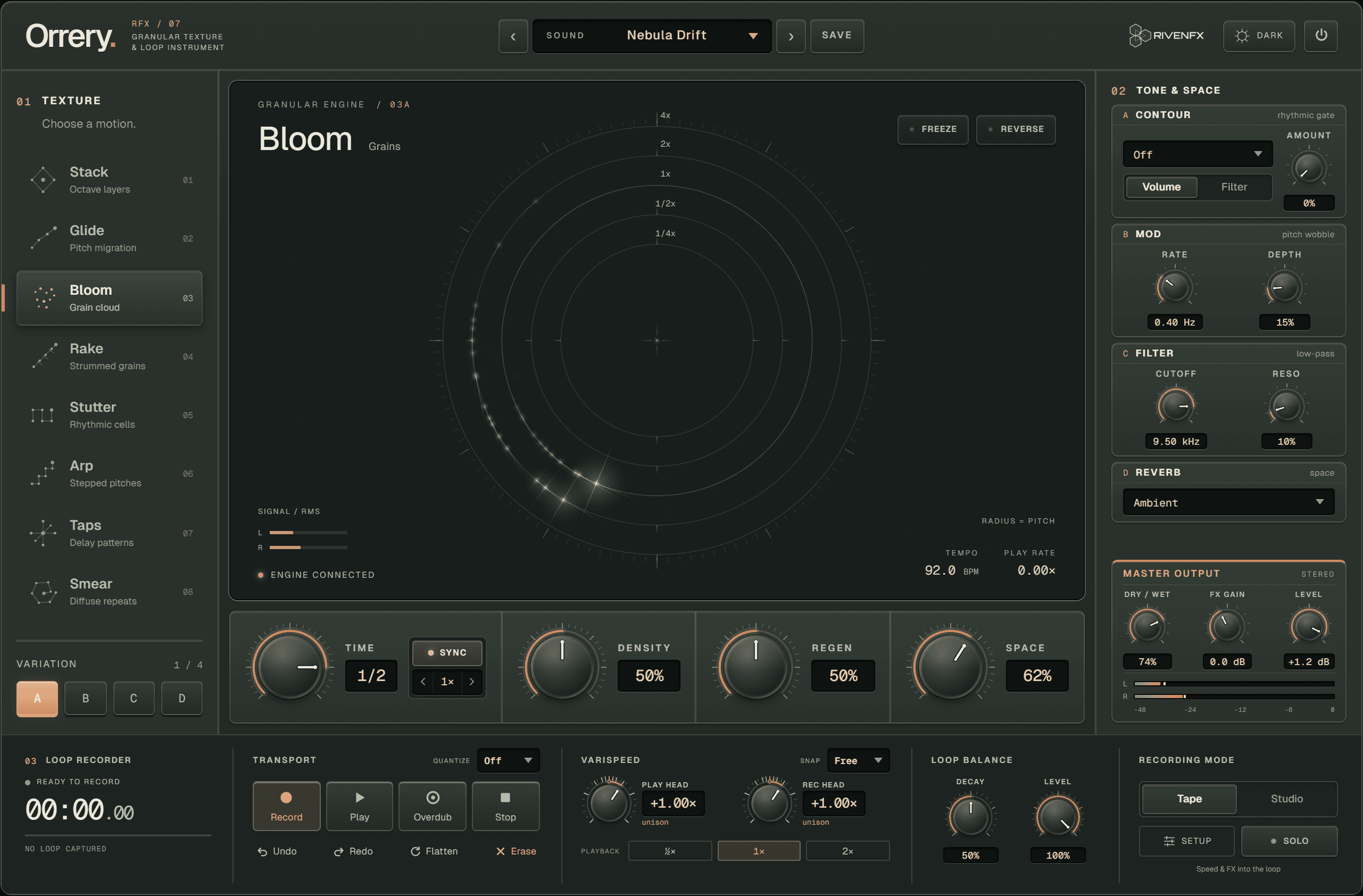
Graphite and copper, or enamel and brick. One switch in the header and the whole interface follows, from the dials to the frame around the orbital monitor.

Orrery dark interface
RFX07 / PLUGIN INTERFACE
Orrery interface in detail
THE IDEA

The loop is a ring and its heads are satellites. Every grain orbits at a radius set by its pitch, the same picture the plugin draws.

¼×½×1×2×4×PLAY HEAD · −4× … +4×THROUGH ZERO INTO REVERSERECORD HEADITS OWN RATE, ALSO SIGNEDTHE LOOP IS A RINGRADIUS = PITCH½× IS A REAL OCTAVE DOWN2× A REAL OCTAVE UP
TRY IT ON

Where it earns its place.

  1. 01

    Strum one chord and let it become a slow, self-sustaining pad.

  2. 02

    Turn a single held note into a self-playing arpeggio.

  3. 03

    Record a phrase, drop it to half speed and grow an octave-down bed beneath it.

HOW IT WORKS

From insert to result.

  1. STEP 01

    Insert and play

    Put Orrery on an audio or instrument track, pick First Light or Nebula Drift, and play a chord. Within a beat or two the engine catches your notes and starts re-firing them.

  2. STEP 02

    Choose a motion

    Step through the eight engines and their A–D variations. Every switch crossfades rather than cutting, so you can browse while you play.

  3. STEP 03

    Steer with four dials

    Time sets the event clock, Density how busy it is, Regen how long material lingers, Space how far it opens into the reverb.

  4. STEP 04

    Loop it, then bend it

    Record a phrase, close the loop, drop the play rate to ½× and overdub in Tape mode: the octave-down copy blends into the loop and keeps deepening.

IN DETAIL

What is under the hood.

01

Authentic varispeed

All pitch in the engine is varispeed. Half speed is one octave down, double speed one octave up. Nothing is pitch-shifted.

02

Locked to your tempo

The event clock syncs from 1/16 triplet to a whole note, with dotted and triplet values, scaled ¼× to 8×. Or turn Sync off and set it in milliseconds.

03

Freeze and Reverse

Freeze holds the engine’s current buffer as a sustained, shimmering snapshot while live input is ignored. Reverse flips the grain direction.

04

Pre or Post

Loop the finished wet sound, or loop the dry input and feed it into the engine. Loop-Only bypasses the engine so you hear just the raw loop.

05

Resample and go again

Resample renders the audible loop, including its speed, into a fresh 1× buffer, giving clean headroom to varispeed again from a new baseline.

06

Safe to browse

The twelve factory presets are loudness-matched on a reference pad to within 0.1 dB, and presets never change bypass, freeze or the loop transport.
SPECIFICATIONS

The facts.

FORMATSVST3 · AU on Mac
ENGINES8 in four families · 4 variations each
LOOPER60 s · play and record heads −4× to +4× · 8-layer undo
OVERDUBTape (bakes the varispeed copy) · Studio (clean layers)
REVERBRoom · Dark · Hall · Ambient
LATENCY0 samples
CPUBusiest preset 1.2% of a core at 44.1 kHz, 2.8% at 96 kHz (test machine)
PRESETS12 factory, loudness-matched · unlimited user
INTERFACELive orbital monitor · resizable · light and dark

Worth knowing. The loop buffer is fixed at 60 seconds in this version. There is no MIDI input and no drag-out export of loops, and bar quantisation assumes 4/4. Freeze and loops can sustain indefinitely, so set an explicit end when you render.

RFX07 / READY WHEN YOU ARE

Play something simple. Get a world back.

Try the demo with your own material first. Activation removes the interruptions and keeps the plugin yours.

Launch offer40% off
Launch price: £29£49after launch
Save £20 at launch
Download the demo
BEFORE YOU BUY

Questions people ask.

Is it an instrument or an effect?

An audio effect. Insert it on any audio or instrument track and it processes what you play into it. It makes no sound of its own.

Does it add latency?

No. The engine reports zero samples of latency, so it is safe to play through live.

Does my loop survive closing the project?

Yes. Loop audio, every parameter and the looper state are saved with your session. On a sample-rate change the loop is resampled, its length preserved, and parked in Stopped.

How does it run on a Mac?

The Mac download is a universal VST3 and Audio Unit for Apple silicon and Intel. It is not yet notarized by Apple, so macOS asks you to allow it once; the included note walks you through it.

How does the demo behave?

The demo briefly mutes the output at intervals and runs a ten-day trial counter. Activation with your key or an offline licence file removes the interruptions.

BEFORE YOU DOWNLOAD

A good fit for your setup.

Windows & Mac · VST3 + AU

Windows builds are 64-bit VST3. Mac builds are universal for Apple silicon and Intel, with VST3 and Audio Unit formats. Check the compatibility and installation guide before buying.

Windows requires Microsoft WebView2. Mac uses its built-in WebKit and needs no separate web runtime. Mac downloads currently use local signing and are not Apple-notarized; see the Mac installation notes.

Try it with your own session

Demo audio is briefly muted at intervals, with a ten-day trial counter. Activation with your key or an offline licence file removes the interruptions.

Downloads & setup